


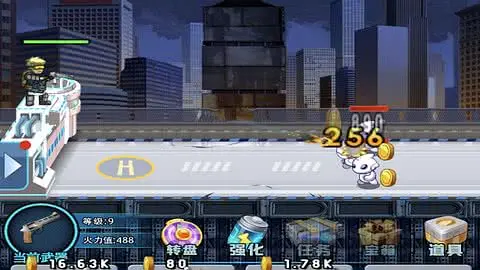
全名枪机 (精准射击适配版)
本方案由源码大陆优化:射击类游戏最怕点击偏移,本补丁专门修复全屏切换后的输入映射丢失与按钮“假死”现象。
技术规格
坐标校准
坐标校准
核心引擎:Cocos Creator (Native Web)
解决痛点:点击偏移 / 按钮失效 / 适配回弹
解决痛点:点击偏移 / 按钮失效 / 适配回弹
🛠️ 逻辑优化说明(站长亲测)
- Canvas 焦点锁定: 射击游戏在某些浏览器切换后台回来后,Canvas 会丢失焦点导致操作无效。代码通过
canvas.focus()强制激活,确保点击即响应。 - 输入管理器重置: 针对全屏切换时常见的触控终点异常,手动重写了
_updateTouchEnd逻辑,彻底终结点击位置与子弹落点不匹配的 Bug。 - 动态 Widget 刷新: 游戏中许多广告和奖励按钮是后载入的,通过
cc.director.getScene().walk深度遍历,确保所有动态 UI 都能自动对齐。 - 多轮布局锁定: 适配逻辑采用了渐进式触发,从 300ms 到 2500ms 进行多轮校正,应对各种网络环境下的资源加载延迟。
<!DOCTYPE html>
<html>
<head>
  <meta charset="utf-8">
  <title>Cocos Creator | thegungame</title>

  <meta name="viewport" content="width=device-width, initial-scale=1, minimum-scale=1, maximum-scale=1, user-scalable=no, viewport-fit=cover"/>
  <meta name="apple-mobile-web-app-capable" content="yes">
  <meta name="apple-mobile-web-app-status-bar-style" content="black-translucent">
  <meta name="format-detection" content="telephone=no">
  <meta name="renderer" content="webkit"/>
  <meta http-equiv="X-UA-Compatible" content="IE=edge,chrome=1"/>
  <meta name="msapplication-tap-highlight" content="no">

  <link rel="stylesheet" type="text/css" href="style-mobile.6e9cd.css"/>
  <link rel="icon" href="favicon.8de18.ico"/>

  <style>
    html, body {
      margin: 0 !important;
      padding: 0 !important;
      width: 100% !important;
      height: 100% !important;
      overflow: hidden !important;
      background: #000 !important;
      touch-action: none !important;
    }
    #GameCanvas {
      position: fixed !important;
      top: 0 !important;
      left: 0 !important;
      width: 100% !important;
      height: 100% !important;
      display: block !important;
      pointer-events: auto !important;
    }
    #splash {
      position: fixed !important;
      inset: 0 !important;
      width: 100% !important;
      height: 100% !important;
      background: #000;
      z-index: 9999;
      pointer-events: none;
    }
  </style>
</head>
<body>
  <canvas id="GameCanvas" oncontextmenu="event.preventDefault()" tabindex="0"></canvas>
  <div id="splash">
    <div class="progress-bar stripes">
      <span style="width: 0%"></span>
    </div>
  </div>

  <script src="src/settings.2a661.js" charset="utf-8"></script>
  <script src="main.dd0cb.js" charset="utf-8"></script>

  <script type="text/javascript">
  (function () {
      if (typeof VConsole !== 'undefined') {
          window.vConsole = new VConsole();
      }
      var debug = window._CCSettings.debug;
      var splash = document.getElementById('splash');
      splash.style.display = 'block';

      function loadScript (moduleName, cb) {
        function scriptLoaded () {
            document.body.removeChild(domScript);
            domScript.removeEventListener('load', scriptLoaded, false);
            cb && cb();
        };
        var domScript = document.createElement('script');
        domScript.async = true;
        domScript.src = moduleName;
        domScript.addEventListener('load', scriptLoaded, false);
        document.body.appendChild(domScript);
      }

      loadScript(debug ? 'cocos2d-js.js' : 'cocos2d-js-min.9ff16.js', function () {
        if (CC_PHYSICS_BUILTIN || CC_PHYSICS_CANNON) {
          loadScript(debug ? 'physics.js' : 'physics-min.js', window.boot);
        }
        else {
          window.boot();
        }
      });

      // ====================== 核心修复:全屏/resize 后按钮可点击 ======================
      function fixButtonClickable() {
        const canvas = document.getElementById('GameCanvas');
        if (!canvas) return;

        const w = window.innerWidth;
        const h = window.innerHeight;

        canvas.style.width = w + 'px';
        canvas.style.height = h + 'px';
        canvas.width = w * (window.devicePixelRatio || 1);
        canvas.height = h * (window.devicePixelRatio || 1);

        canvas.focus();  // 激活焦点,防点击失效

        setTimeout(() => {
          if (window.cc) {
            const view = cc.view;
            if (view) {
              // SHOW_ALL 保持比例完整显示(推荐竖屏游戏)
              view.setResolutionPolicy(cc.ResolutionPolicy.SHOW_ALL);
              // 如果游戏是横屏,试换成 FIXED_WIDTH
              // view.setResolutionPolicy(cc.ResolutionPolicy.FIXED_WIDTH);

              view.setFrameSize(w, h);
              view.resizeWithBrowserSize(true);
            }

            // 强制刷新所有 Widget 和 Button(动态广告按钮关键)
            if (cc.director && cc.director.getScene()) {
              cc.director.getScene().walk(function(node) {
                var widget = node.getComponent(cc.Widget);
                if (widget) widget.updateAlignment();

                var button = node.getComponent(cc.Button);
                if (button) {
                  button.enabled = true;
                }
              });
            }

            // 重置输入管理器(治坐标偏移)
            if (cc.sys && cc.sys.__inputManager__) {
              cc.sys.__inputManager__._updateTouchEnd = true;
            }
          }
        }, 80);
      }

      // 监听事件
      window.addEventListener('resize', fixButtonClickable);
      document.addEventListener('fullscreenchange', fixButtonClickable);
      document.addEventListener('webkitfullscreenchange', fixButtonClickable);
      window.addEventListener('load', fixButtonClickable);

      // 定时刷新(广告按钮动态出现后也能修复)
      setInterval(fixButtonClickable, 800);

      // 启动多轮
      setTimeout(fixButtonClickable, 300);
      setTimeout(fixButtonClickable, 1000);
      setTimeout(fixButtonClickable, 2500);
  })();
  </script>
</body>
</html>
原创
温馨提示:
感谢阅读!本文由 源码大陆 原创分享。
如果教程对你有帮助,欢迎转发分享给更多朋友!转载请务必保留本文出处。
本文链接:
© 版权声明
© 版权声明:本站资源均由会员上传或网络收集,仅供游戏源码研究与技术学习,请于24小时内删除。如有侵权请联系 44416072@qq.com,详情请阅读:源码大陆免责协议。
THE END
暂无评论内容